
How to Use the “Referral Code”
Skip to main content
A Referral Code is a unique code made up of letters, numbers, or a combination of both. If someone has provided you with a Nexa Nurse Referral Code, you can enter it during registration.
How to Enter a Referral Code
- Download and install the Nexa Nurse App.
- Open the App and begin your registration as either a Health Professional or Patient.
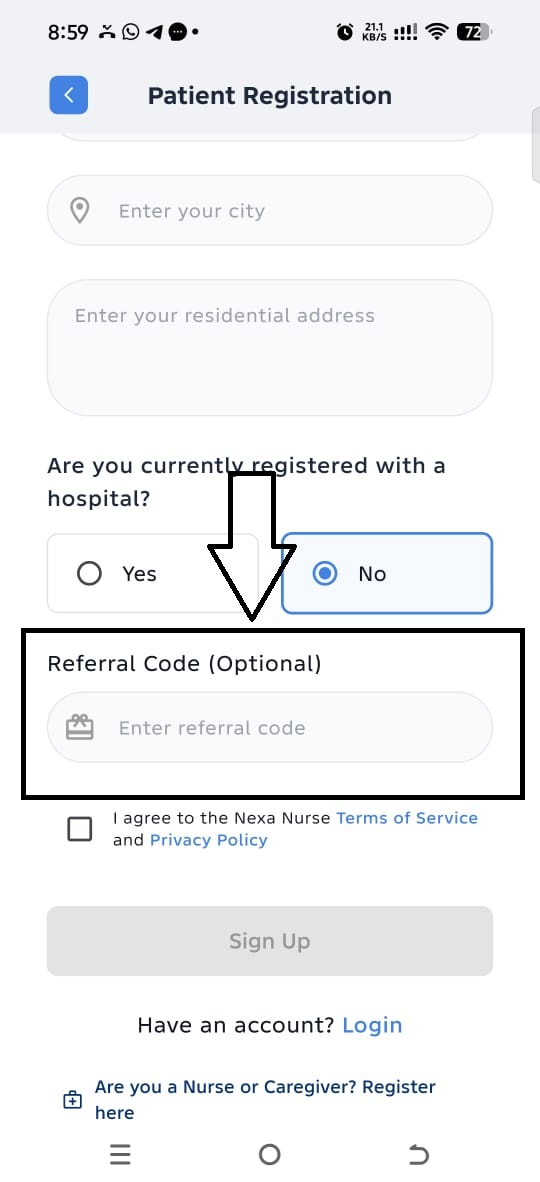
- On the registration page, scroll to the bottom.
- Locate the field labelled “Referral Code (Optional)”.
- Enter the Referral Code provided to you.
- Continue and complete your registration.
Important Information
The Referral Code field is optional. If you do not have a Referral Code, you can leave the field blank and continue with your registration.
Nexa Nurse automatically tracks all referral codes and the referrals generated through them. Monthly referral reports are sent to the person or organisation that provided the referral code, showing the referral activity associated with their code.
Below is the Health Professional Registration page

Below is the Patent Registration page